

Hosting webinars has become essential for businesses looking to connect with audiences, generate leads, and share expertise at scale. Whether you’re planning educational sessions, product demos, or company-wide meetings, choosing the right webinar software can make or break your virtual events.
The webinar market offers dozens of platforms, each promising seamless streaming, robust features, and exceptional user experience. Some excel at large-scale events, while others shine for intimate workshops. Some prioritize ease of use, while others offer advanced customization options.
What is Webinar Software?
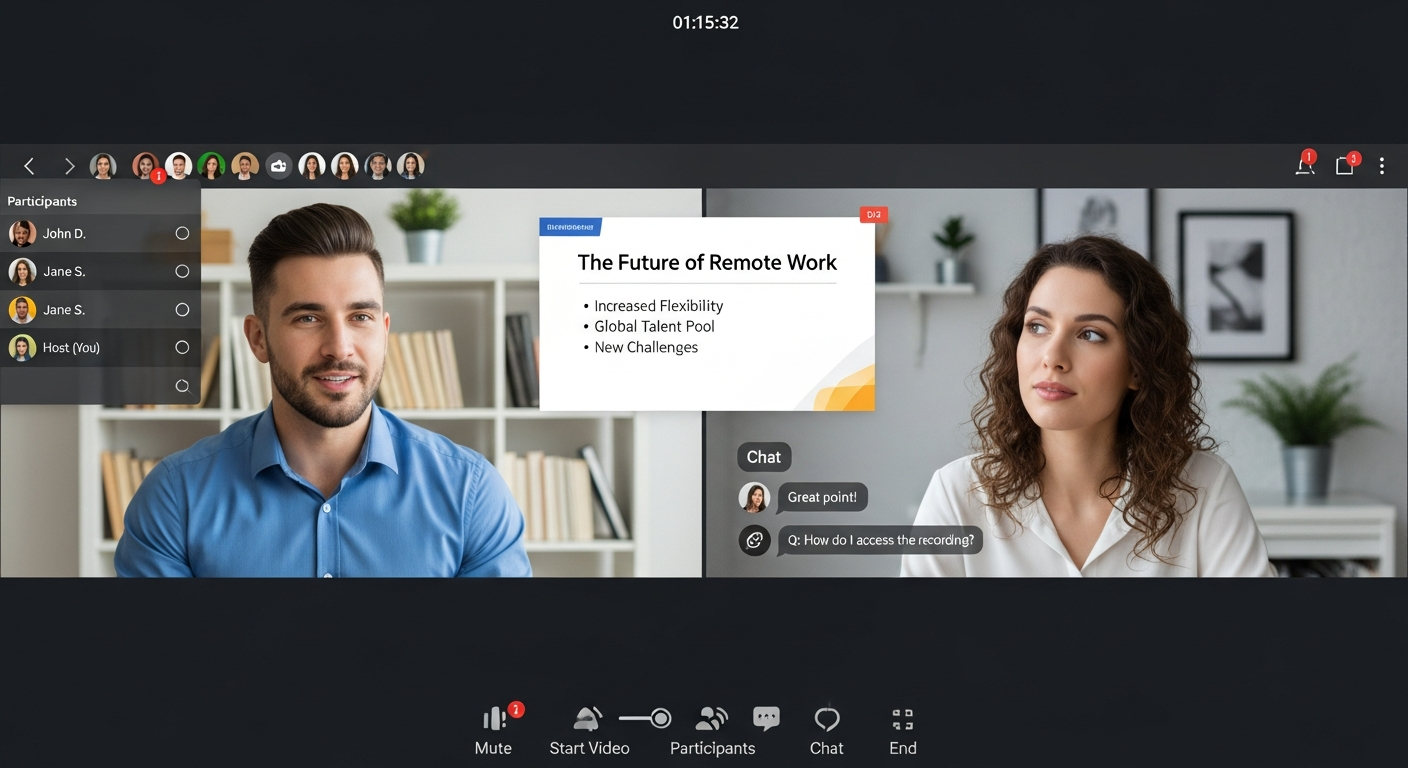
Webinar software is a digital platform that enables you to broadcast live or pre-recorded video presentations to multiple participants over the internet. Unlike basic video conferencing tools, webinar platforms are specifically designed for one-to-many communication, where presenters share content with a larger audience.
Modern webinar software typically includes features like screen sharing, interactive polls, chat functions, registration management, and detailed analytics. Many platforms also support hybrid events, allowing both live and recorded content delivery.
The technology has evolved significantly from early streaming solutions. Today’s webinar software integrates with marketing automation tools, customer relationship management systems, and social media platforms to create comprehensive event experiences.
Essential Features to Look for in Webinar Software
Broadcasting Capabilities
The foundation of any webinar platform is its ability to deliver high-quality video and audio to your audience. Look for software that supports HD video streaming, multiple camera angles, and reliable audio transmission, even with large participant numbers.
Consider bandwidth requirements and how the platform handles varying internet connection speeds. The best webinar software automatically adjusts video quality based on each participant’s connection, ensuring smooth playback for everyone.
Registration and Attendee Management
Effective webinar software should streamline the entire attendee journey from registration to follow-up. Key features include customizable registration pages, automated confirmation emails, and reminder sequences.
Advanced platforms offer attendee segmentation, custom registration fields, and integration with your existing customer database. This allows you to gather valuable information about participants and personalize their experience.
Interactive Features
Engagement tools separate professional webinar software from basic streaming solutions. Essential interactive features include:
Live chat and Q&A: Allow real-time communication between presenters and attendees
Polls and surveys: Gather instant feedback and maintain audience attention
Screen sharing: Present slides, software demos, or other visual content
Breakout rooms: Enable smaller group discussions during larger events
Hand raising: Let participants signal when they want to speak or ask questions
Recording and Playback Options
Most webinar software includes recording capabilities, but quality and functionality vary significantly. Look for platforms that offer high-definition recordings, automatic cloud storage, and easy sharing options.
Some advanced features to consider include automatic transcription, video editing tools, and the ability to create on-demand libraries from your recorded content.
Analytics and Reporting
Comprehensive analytics help you measure webinar success and improve future events. Quality webinar software provides detailed reports on attendance rates, engagement levels, and participant behavior.
Look for platforms that track metrics like average viewing time, interaction rates, and conversion data. Integration with Google Analytics or other tracking tools can provide even deeper insights into your webinar performance.
Types of Webinar Software Solutions
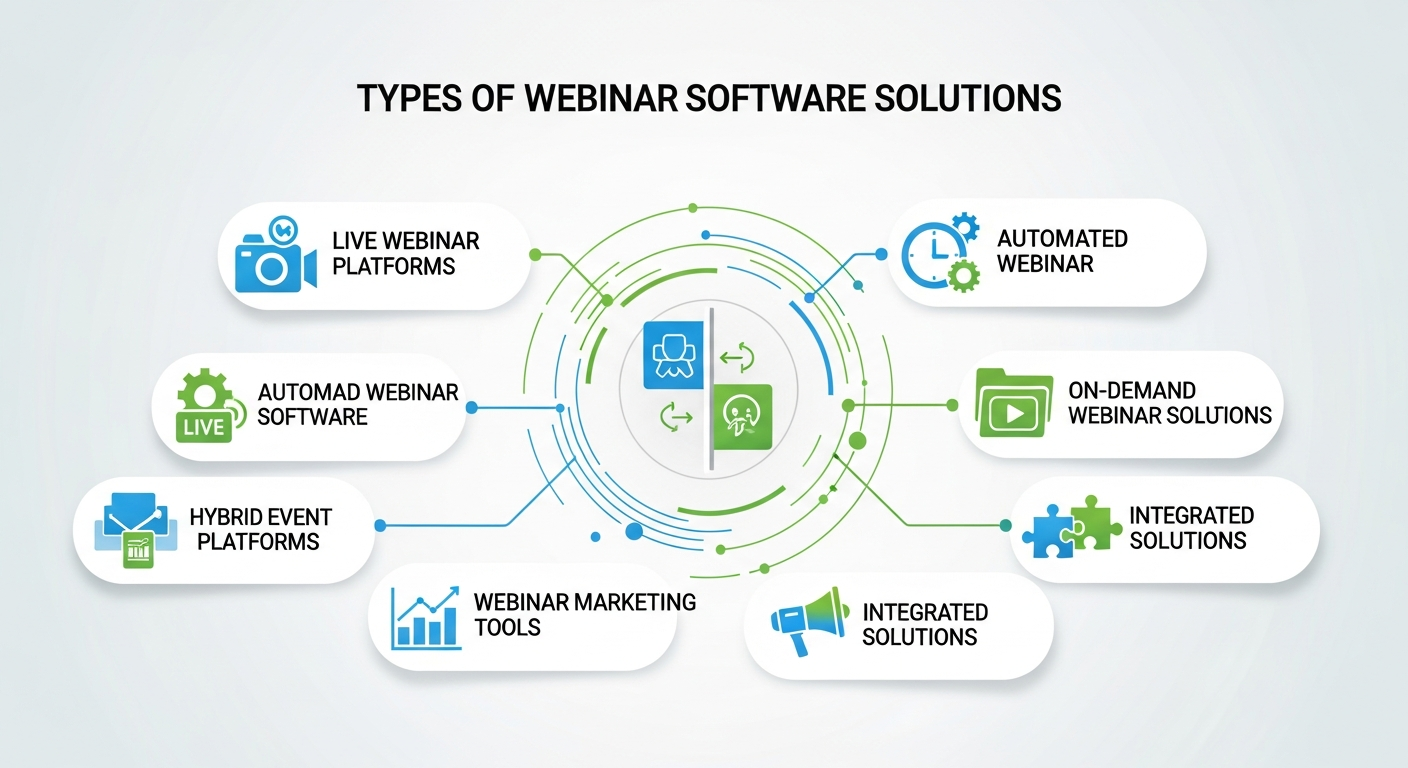
All-in-One Platforms
Comprehensive webinar software solutions handle everything from registration to post-event follow-up within a single platform. These tools typically offer the most features but may come with steeper learning curves and higher costs.
All-in-one platforms work best for organizations that host regular webinars and need sophisticated functionality like advanced analytics, marketing automation integration, and custom branding options.
Video Conferencing Tools with Webinar Features
Many popular video conferencing platforms have expanded to include webinar capabilities. These solutions offer familiar interfaces and often integrate seamlessly with existing communication workflows.
While convenient, these hybrid tools may lack specialized webinar features like advanced registration management or detailed engagement analytics.
Specialized Broadcasting Platforms
Some webinar software focuses specifically on high-quality video delivery and large-scale broadcasting. These platforms excel at handling thousands of simultaneous participants with minimal technical issues.
Specialized broadcasting solutions work well for major product launches, industry conferences, or other high-stakes events where technical reliability is paramount.
Popular Webinar Software Options
Enterprise Solutions
Large organizations often require webinar software with advanced security features, extensive customization options, and dedicated support. Enterprise platforms typically offer single sign-on integration, custom branding, and compliance features for regulated industries.
These solutions usually involve custom pricing and may require significant setup time and technical resources.
Mid-Market Platforms
Mid-market webinar software strikes a balance between functionality and affordability. These platforms offer professional features like custom registration pages, detailed analytics, and marketing integrations without enterprise-level complexity.
Most mid-market solutions use tiered pricing based on participant limits or feature access, making them scalable as your webinar program grows.
Budget-Friendly Options
Several webinar software providers offer free or low-cost plans suitable for small businesses or occasional users. While these platforms may have participant limits or fewer features, they can provide excellent value for organizations just starting with webinars.
Budget options often include basic recording, screen sharing, and chat functionality—sufficient for simple presentations or internal training sessions.
How to Choose the Right Webinar Software
Assess Your Needs
Start by defining your specific webinar requirements. Consider factors like typical audience size, event frequency, required features, and the technical expertise of your team.
Create a prioritized list of must-have versus nice-to-have features. This will help you focus on platforms that meet your core needs without paying for unnecessary functionality.
Consider Integration Requirements
Evaluate how webinar software will fit into your existing technology stack. Look for platforms that integrate with your email marketing tools, customer relationship management system, and analytics platforms.
Seamless integrations can significantly streamline your webinar workflow and improve data consistency across your marketing efforts.
Test Platform Performance
Most webinar software providers offer free trials or demo accounts. Take advantage of these opportunities to test platforms with your actual use cases and participant numbers.
Pay attention to ease of setup, user interface intuitiveness, and technical reliability during your testing phase. Consider running a small test webinar with colleagues to identify potential issues.
Evaluate Support and Training
Webinar Software for Lead Generation and Sales Enablement
Webinar software plays a critical role in modern lead generation and sales strategies. Advanced platforms allow businesses to capture attendee data through registration forms, polls, and post-event surveys. This information helps segment leads based on interest level, behavior, and engagement. Many webinar tools integrate directly with CRM and marketing automation systems, enabling seamless follow-ups, personalized email nurturing, and sales outreach. Features like gated replays, CTAs during sessions, and downloadable resources further drive conversions. When used strategically, webinar software becomes more than a presentation tool—it transforms into a scalable sales enablement channel that shortens sales cycles and improves lead quality.
Branding and Customization Capabilities
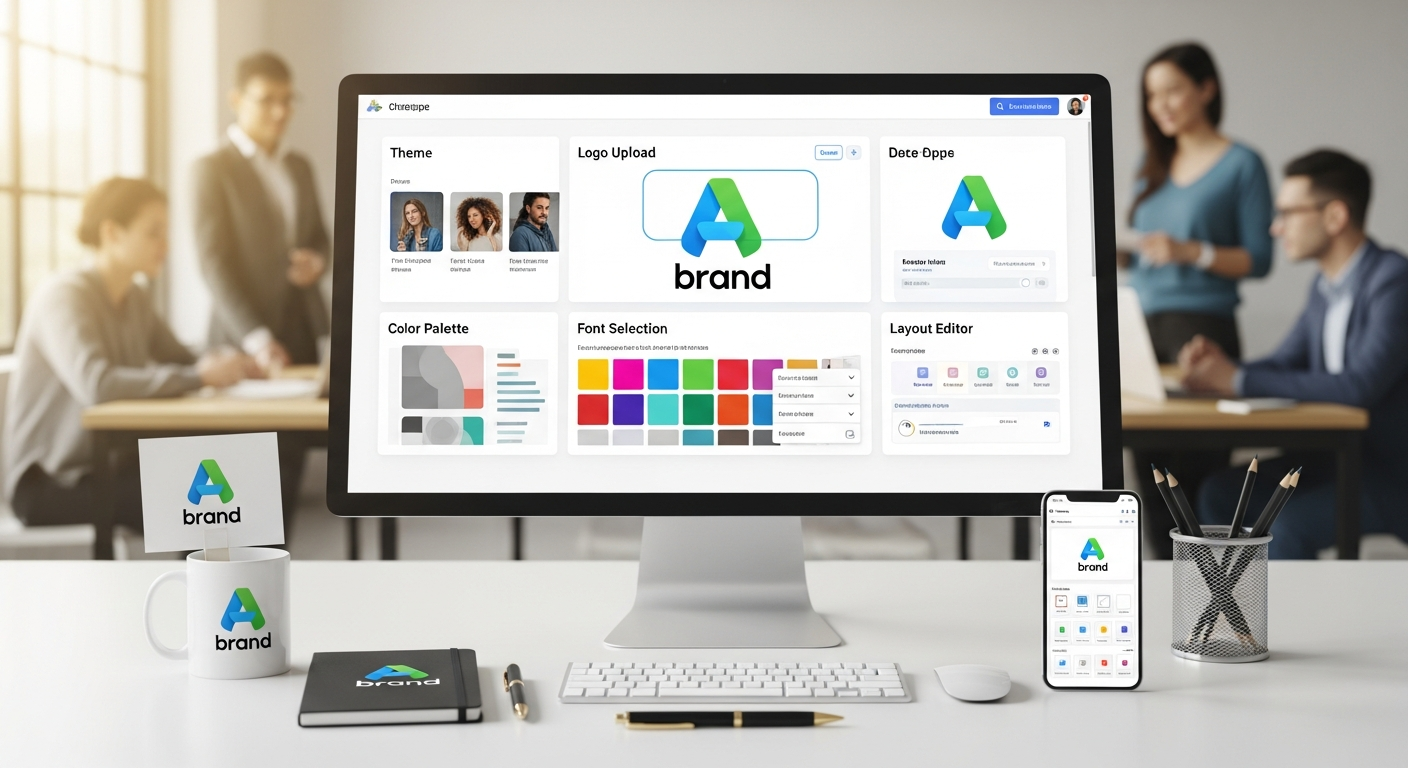
Strong branding creates a professional and memorable webinar experience. Quality webinar software allows full customization of registration pages, confirmation emails, webinar rooms, and presentation layouts. Businesses can add logos, brand colors, custom domains, and branded backgrounds to maintain visual consistency. Advanced platforms also support white-labeling, removing third-party branding entirely. Customization builds trust with attendees and reinforces brand authority. For customer-facing webinars such as product launches or thought leadership sessions, consistent branding significantly improves credibility and audience perception. Choosing software with flexible branding options ensures your webinars feel like a natural extension of your brand ecosystem.
Security and Privacy Considerations
Security is a crucial factor when hosting webinars, especially for internal meetings, paid events, or sensitive discussions. Reliable webinar software includes features such as password-protected sessions, waiting rooms, encrypted streaming, and role-based access controls. Some platforms also offer compliance with regulations like GDPR, HIPAA, or SOC 2, making them suitable for regulated industries. Host controls—such as muting participants, removing attendees, and disabling downloads—add additional protection. Strong security measures prevent unauthorized access, data leaks, and disruptions, ensuring a safe and professional experience for both presenters and attendees.
Scalability for Growing Webinar Programs
As your webinar strategy matures, scalability becomes essential. The right webinar software should support increasing audience sizes, more frequent events, and diverse formats without sacrificing performance. Scalable platforms offer flexible participant limits, multi-host support, and automated workflows for recurring webinars. Some also include multi-language support and regional streaming optimization for global audiences. Choosing scalable software prevents the need for frequent platform changes as your needs evolve. It also ensures consistent data tracking, branding, and audience experience as your webinar program expands across departments, regions, or customer segments.
Accessibility and Inclusive Webinar Experiences
Modern webinar software must support accessibility to ensure inclusive participation. Features such as live captions, screen reader compatibility, keyboard navigation, and adjustable font sizes help accommodate diverse audiences. Some platforms also support real-time translation or multilingual interfaces, making webinars accessible to global attendees. Accessibility not only expands reach but also demonstrates social responsibility and professionalism. Inclusive webinar design improves engagement, reduces drop-off rates, and enhances overall user experience. Businesses that prioritize accessibility benefit from wider audience participation and stronger brand reputation.
On-Demand Webinars and Content Repurposing
On-demand webinars extend the value of live events long after they end. Advanced webinar software allows automatic publishing of recordings, gated replay access, and content libraries. Businesses can repurpose webinar recordings into blog posts, short videos, podcasts, and lead magnets. This maximizes ROI from a single event while serving audiences who couldn’t attend live. On-demand webinars also support evergreen lead generation by capturing registrations continuously. Platforms with strong hosting, analytics, and content management features make it easier to turn webinars into long-term marketing assets.
Making Your Webinar Software Decision

Choosing the right webinar software requires balancing features, cost, and ease of use for your specific situation. Start with a clear understanding of your requirements, test your top options thoroughly, and consider both immediate needs and future growth plans.
The best webinar software is the one that your team will actually use consistently and that provides reliable performance for your audience. Focus on platforms that offer the features you need most while staying within your budget and technical capabilities.
Ready to start your search? Begin by listing your top three must-have features and use that as your initial filter when evaluating different webinar software options.
Conclusion
Choosing the right webinar software is a strategic decision that directly impacts engagement, lead generation, and brand perception. By prioritizing features such as scalability, interactivity, security, and integration, businesses can create professional, high-impact virtual events. The right platform empowers teams to deliver consistent, valuable experiences that drive measurable results.
Frequently Asked Questions (FAQ)
1. What is the difference between webinar and video conferencing software?
Webinar software is designed for one-to-many presentations, while video conferencing supports group discussions.
2. How many attendees can webinar software support?
This varies by platform, ranging from dozens to tens of thousands.
3. Can webinars be recorded automatically?
Yes, most modern platforms offer automatic cloud recording.
4. Is webinar software suitable for internal training?
Absolutely, especially for company-wide or remote teams.
5. Do webinars help with lead generation?
Yes, webinars are one of the most effective B2B lead-generation tools.
6. Can I host paid webinars?
Many platforms support payment integrations and gated access.
7. Are mobile users supported?
Most platforms offer mobile-friendly access or apps.
8. What internet speed is required for hosting?
Stable broadband with at least 5 Mbps upload is recommended.
9. Can webinars integrate with CRM tools?
Yes, most platforms support CRM and marketing tool integrations.
10. Are free webinar tools reliable?
They work for small events but may have limitations.




Webinar Analytics: A Complete Guide to Measuring Success and Improving Performance
The Ultimate Webinar Follow-Up Strategy to Turn Attendees into Customers
Webinar Accessibility Best Practices: How to Make Your Online Events Inclusive for All
Webinar Personalization: Tailoring Content to Audience Segments for Maximum Engagement